
Whether you’re moving from a legacy carrier to SIP trunking, switching VoIP providers, or consolidating numbers during a cloud migration, number porting for business is one of the most critical parts of the process.

This guide is designed for IT teams, operations managers, business leaders, and MSPs who are planning to port business phone numbers and want to make sure it’s done right. We’ll cover everything you need to know, from what porting means and what the law says, to the exact documents you need, how to prepare, and what to do if something goes wrong.

In this Guide:

Main Questions About Numer Porting

  • For a simple port, the process usually takes 1–3 business days once all data is validated. Complex ports — like multi-number, multi-location, or international ports — can take anywhere from 5 to 15+ business days, depending on the providers and regions involved.

  • Porting your number lets you keep your existing business identity while switching to a better, more cost-effective provider. It gives you freedom to upgrade to modern platforms like VoIP or SIP trunking without losing customer recognition or continuity. It also allows businesses to consolidate telecom systems and reduce long-term costs — all while keeping the same trusted numbers.

  • The very first step is to gather accurate account information from your current provider — usually via a Customer Service Record (CSR) or recent invoice. This ensures your port request won’t be rejected due to mismatched data. Once verified, your new provider can submit the port request along with your signed Letter of Authorization (LOA).

TL;DR — What to Know About Number Porting for Business

  • You have the right to port your number. In most countries, you own your number, not your provider.

  • Number porting requires precision. Even small data mismatches (like address or account number) can cause delays or rejections.

  • You’ll need key documents. A recent invoice, Letter of Authorization (LOA), and Customer Service Record (CSR) are must-haves.

  • Plan it like a real project. Map call flows, test after porting, and avoid canceling old services too early.

  • Simple ports can take 1–3 days. Larger or complex ports can take 5–15+ days depending on the scenario.

  • Telxi helps you port smoothly. With expert support, accurate planning, and minimal downtime, we make number porting less painful.

What Is Number Porting for Business?

Number porting means moving your existing business phone numbers from one provider to another without changing the actual number. It allows you to switch telecom carriers, upgrade to VoIP/SIP, or consolidate your communications platform while keeping the same numbers your customers already know.

number porting

For example, if your support line is +1 (800) 123‑4567 and you switch from a legacy telco to a cloud-based SIP provider, porting ensures that number still works exactly the same but, with a new provider behind it.

Why It’s a Big Deal for Business

Your business phone number is part of your identity and customer experience:

  • It’s printed on your website, business cards, and Google listings.

  • Customers recognise and trust it, especially in support or sales.

  • It may be tied to workflows like IVRs, CRM logs, and call tracking.

When Do Businesses Need to Port Numbers?

Businesses typically need to port numbers when they are switching from one VoIP or SIP provider to another, migrating from PRI lines to SIP trunking, or consolidating multiple phone systems during a merger, acquisition, or broader cloud migration.

Porting is also common when expanding internationally and centralising the management of DIDs across regions, or when rebranding or restructuring telecom systems across multiple locations or business units. In all these cases, number porting allows businesses to modernise their communications infrastructure without disrupting customers or losing established phone numbers

In all cases, porting ensures continuity while allowing modernisation.

Number Porting vs. Call Forwarding: What’s the Difference?

Some businesses think call forwarding is a substitute for porting, but they serve different purposes.

FeatureNumber PortingCall Forwarding
OwnershipYou transfer full control of the number to the new providerYou keep the number with the old provider, who forwards calls
ControlFull control over routing, billing, and featuresLimited to what the old provider allows
Long-Term SolutionYes — meant for permanent provider changesNo — typically used for short-term transitions
CostUsually a one-time or admin feeOngoing per-minute or monthly fees may apply
Use CaseSwitching providers, SIP migration, UCaaS setupTemporary failover, dual-provider setups, transitions

How Number Porting Works

Number porting for business phone number is a regulated, multi-step process that involves verifying your account details, submitting authorization, scheduling a cutover, and testing the number on the new system. While it can seem complex, it becomes much easier when you understand how each step works, so here is a break down:
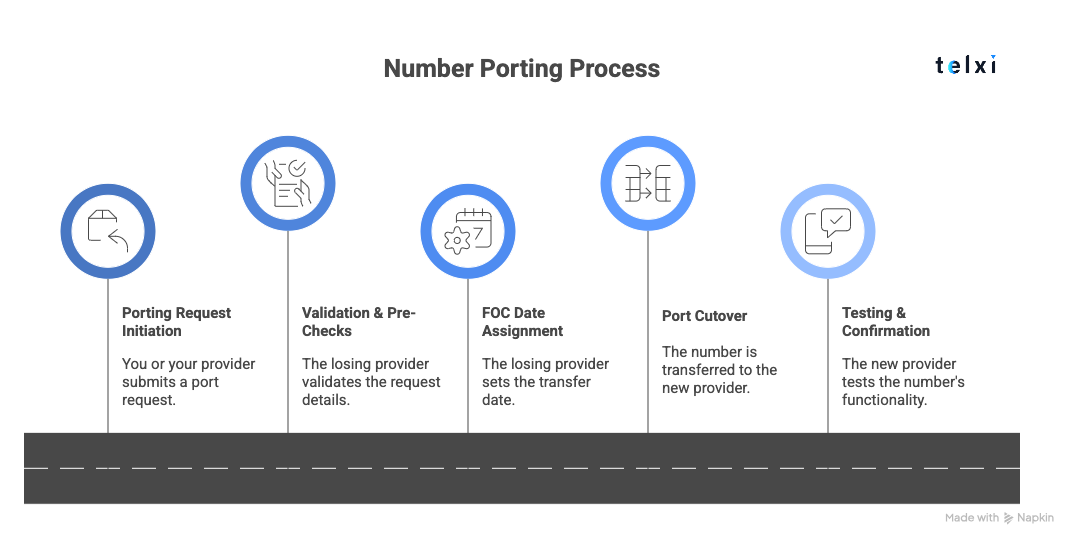
porting number process

  1. Porting Request Initiation: You (or your gaining provider) submit a port request with the necessary documentation, including a Letter of Authorization (LOA), account details, and possibly a Customer Service Record (CSR).

  2. Validation & Pre-Checks: The gaining provider sends the request to the losing provider. The losing provider checks the submitted information (account name, billing telephone number (BTN), address, etc.) against their records. Any mismatches can trigger rejections and delays.

  3. FOC Date Assignment: Once the information is validated, the losing provider issues a Firm Order Commitment (FOC) date — this is the scheduled day/time the number will officially transfer.

  4. Port Cutover: On the FOC date, the number is disconnected from the losing provider and becomes active with the gaining provider. This is the critical moment — smooth cutovers depend on preconfigured routing and test plans.

  5. Testing & Confirmation: After cutover, the gaining provider performs testing to confirm that calls are routing correctly, inbound and outbound. Any issues (like one-way audio, routing mismatches, or number not reachable) must be resolved quickly.

Terms Used on Number Porting

During the number porting process, you’ll encounter some key industry terms. Here’s what they mean:

  • BTN (Billing Telephone Number): The main number on the account, used to identify and validate the port request.

  • LOA (Letter of Authorization): A signed document from the customer giving permission to transfer the number to the new provider.

  • CSR (Customer Service Record): A document from the losing carrier that includes all account data tied to your numbers — incredibly helpful for accurate porting.

  • FOC (Firm Order Commitment): The official date the port is scheduled to happen, issued after the losing provider approves the request.

  • Porting PIN: In some regions or with mobile numbers, a special PIN is required to verify the transfer.

  • Simple vs Complex Port: A simple port usually involves one number from a standard account and can be completed quickly. A complex port might involve multiple numbers, services (like fax or alarm lines), or large account configurations — and often takes longer.

What the Regulations Say: Rights, Timelines, and Exceptions

In most regions, rules ensure that legitimate port requests are completed within defined timelines and that carriers can’t arbitrarily refuse to release your numbers. Understanding what the regulations require (and what they don’t) helps you prepare and avoid unnecessary delays.

Below are some of the most common doubts about number porting regulations:

Who owns the number?

You own your phone number, not your provider. In most regions with number portability laws, the number belongs to you as long as your service account is active and in good standing. This means that if you validly request a port to a new provider, your carrier is legally obligated to release that number.

This regulatory protection exists to prevent carriers from “holding” numbers hostage just to keep your business. However, porting rights apply only when all requirements are met.

How long should number porting take?

For simple business ports, the process typically completes within one business day once the request is validated. Regulators in many markets (for example, the FCC in the United States) set expectations that straightforward number transfers should be completed quickly — often within one business day after the gaining provider submits a valid request and the losing provider confirms the details.

More complex number ports, such as those involving large blocks of numbers, multi-site accounts, PRI/PSTN migrations, toll-free ranges, or international numbers, can take longer. It’s common for these “project ports” to span 2–15 business days or more, depending on coordination, documentation accuracy, and whether additional validation steps are required.

When can a provider delay or deny a port?

Carriers are allowed to delay or reject a port request, but only under specific, legitimate conditions. The most common reasons for rejection include:

  • Mismatched account data (e.g., incorrect Billing Telephone Number (BTN), address, or account name).

  • Pending disconnection orders — if you’ve already submitted a request to cancel the service, the number may be locked from porting.

  • Unpaid bills or account suspensions — the number must be active and in good standing.

  • Unauthorised request — the LOA must be signed by an authorised contact on the account.

Carriers cannot deny a port simply because they don’t want to lose you as a customer. If a port is rejected, your new provider should receive a clear rejection code and can work with you to correct and resubmit. Persistent, vague rejections can be escalated to local regulators.

Do porting rules differ between countries?

While number portability exists in most developed regions, the rules, timelines, and practices vary. Here’s a high-level comparison:

RegionPorting Rules Summary
USAFCC mandates 1 business day for simple ports; number ownership rights are protected.
UKRegulated by Ofcom; requires valid documentation and can take 1–10 days depending on complexity.
EUPorting is mandatory across member states, but timelines and processes differ by country.
LATAMNumber portability exists in many countries, but processes can be slower or less digitised.
APACMixed landscape — some countries like Australia and Singapore have strong portability; others are still evolving.

For international ports or multi-region numbers, timelines and documentation requirements may be longer and less predictable. It’s critical to work with a provider experienced in handling regional compliance and complex ports.

What Do You Need to Port a Business Number?

For number porting for business to be succesful, you’ll need to provide accurate documentation that proves ownership like a recent invoice, a letter of authorization a CSR and even a porting PIN. It must matches what your current provider has on file. The most common cause of porting delays is mismatched or missing information, so getting this part right is critical.

Here are the key documents and data points you’ll need to gather:

  • Most Recent Invoice or Account Statement – This verifies that the number is active, shows your account number, and helps confirm the billing address and service details.

  • LOA (Letter of Authorization) – A signed letter that gives the new provider permission to request the port. It must include your company name, authorized contact, numbers to be ported, and current provider details.

  • CSR (Customer Service Record) – A detailed record from your current provider that lists all your numbers, the Billing Telephone Number (BTN), account address, and other key identifiers. This is the most reliable way to avoid rejections due to mismatched data.

  • BTN (Billing Telephone Number) – The “main” number on your account. It acts as a reference point for your provider to validate and process port requests.

  • Account Number & Service Address – These must match exactly with what your current carrier has on file. Even a small typo can cause a rejection.

  • Porting PIN – Some providers (especially in mobile or VoIP services) require a special PIN to authorize the port. You may need to request it directly.

Step-by-Step: How to Port Your Business Numbers Smoothly

Below, we break down the exact steps to follow to minimise risk and ensure a seamless cutover.

Step 1: Map Current Numbers and Call Flows

Start by creating a complete inventory of all phone numbers currently in use. This includes more than just direct lines:

  • Direct Inward Dial (DID) numbers assigned to team members or departments

  • Toll-free numbers used for customer support or marketing

  • Hunt groups that route calls to multiple phones

  • IVRs (interactive voice response menus) and call trees

  • Fax lines, alarms, elevators, paging systems, and other analog lines

Understanding how each number functions within your business helps you make decisions about what to port, what to leave behind, and how to maintain continuity during the transition.

Step 2: Pull the Customer Service Record (CSR)

Before submitting your porting request, it’s critical to validate the account data your current provider has on file. The most accurate way to do this is by requesting the Customer Service Record (CSR) from your existing carrier.

The CSR lists the billing telephone number (BTN), authorised contact name, service address, associated numbers and any special notes or conditions on the account. If the CSR isn’t available, your most recent invoice can serve as a backup. Matching your porting request exactly to this information is the best way to avoid delays or rejections.

Step 3: Decide between Full vs Partial Port

At this stage, you’ll need to determine whether you’re porting all your numbers from the current provider or just some of them.

  • A full port moves every number on the account to the new provider. It’s usually cleaner and avoids service fragmentation.

  • A partial port moves only select numbers. This can make sense if you’re running a phased migration or want to keep certain services (e.g., local fax or alarm lines) with your current provider.

AspectFull PortPartial Port
What It MeansAll numbers on the account move to the new provider.Only selected numbers move; others stay with the current provider.
Use CaseClean break or full migration to a new system or provider.Phased migration, service separation, or legacy system retention.
SimplicitySimpler to manage post-port — one provider for all lines.More complex; requires managing two providers.
Impact on ServicesMay cancel all linked services (check for bundled features).Must ensure remaining services (fax, alarms) are not affected.
Risk of FragmentationLowHigher — voice and data services could be split.
Planning RequiredStraightforward cutover strategy.Requires detailed coordination and service mapping.

Important: Partial ports can unintentionally disrupt remaining services, especially if your provider bundles voice with internet, fax, or other features. Always confirm what stays behind and whether those services remain active after the port.

Step 4: Choose a Cutover Strategy

Now decide how and when the port will go live. Your options generally include:

  • Single-date cutover: Move all numbers at once. Simpler for smaller ports but riskier without fallbacks.

  • Phased or project port: Migrate numbers in batches over days or weeks. Ideal for large, multi-site or high-impact migrations.

  • Pilot port: Start with a few low-risk numbers (e.g., internal lines) to validate the process before committing to a full cutover.

This will depend on your number count, system complexity, internal resources, and risk tolerance. In every case, planning for test calls, internal coordination, and fallback routing is essential.

Step 5: Submit the Port and Monitor for FOC

You need to submit the porting request through your new provider officially. They’ll initiate the process with the losing carrier and confirm when the request is accepted.

The key milestone to watch for is the “Firm Order Commitment” date. This is when the number port is scheduled to go live. Between submission and FOC, it’s essential to monitor for any rejections or delays, which are often caused by mismatched information. Staying in close contact with your provider (and your previous one if possible) helps you resolve any issues quickly.

Internally, this is also when you notify your IT team, support agents, or anyone affected by the cutover. Ensuring everyone is aligned in advance will prevent confusion when the port completes.

Step 6: Port Day Readiness

Now it’s time to activate final routing, confirm number registration, and validate that inbound and outbound calls are flowing as expected.

It’s wise to have a rerouting or forwarding strategy ready in case something goes wrong. For example, routing key calls to backup numbers or mobile devices. Your team should also be briefed to recognise any issues quickly, report call failures, and escalate as needed.

When Do You Need to Port Business Numbers?

Number porting for business becomes essential whenever a business changes how or where its phone system is managed. The most common cases are when switching telecom providers, migrating from legacy PRI lines to SIP, moving to a cloud-based PBX, or expanding internationally while keeping local numbers. Below, we break down the most common porting scenarios and what to watch out for.

Migrating from Legacy PSTN or PRI to SIP Trunking

This is one of the most common porting scenarios for established businesses. Since PRI and PSTN rely on physical circuits and copper lines, moving to SIP (which is internet-based) requires a careful shift of not just the numbers but also how call flows and endpoints are configured.

These are usually treated as project ports, meaning multiple numbers, services, and dependencies are involved. Businesses need to evaluate whether any analog devices (like fax machines, alarm lines, or analog IVRs) are still in use and plan alternatives. You’ll also need to redesign how calls are routed to match your new SIP setup.

Risk: Disruption during cutover if legacy routing or hardware dependencies aren’t addressed. Testing and phased cutovers are often recommended.

The Complete Guide to Number Porting for Business in 2026 4 - Telxi

Switching from One VoIP/SIP Provider to Another

If you’re already on a VoIP platform but switching to a better provider (for cost, quality, or features), the porting process tends to be more straightforward.

Even simple ports can go sideways if there’s missing or mismatched account data, or if the losing provider drags their feet or disables routing prematurely. There are always risks of downtime during the transition, especially if call forwarding isn’t in place or DNS/SBC (Session Border Controller) configurations are missed. Always verify routing rules and FOC dates with both providers before port day.

best sip trunking providers article

Migrating to a Cloud PBX or UCaaS Platform (Multi-Platform Migration)

Many businesses are modernising their communications stack by moving to platforms like Microsoft Teams, Zoom Phone, or other UCaaS/cloud PBX providers. These migrations often involve porting numbers from various systems into a single, centralised platform.

This kind of migration typically involves multiple stakeholders, departments, and locations. Porting can be done in phases or all at once, depending on your internal readiness and provider capabilities. Coordination across legacy PBX systems, new cloud platforms, and SIP infrastructure is key.

Porting International Business Numbers

If your business operates globally, you may need to port local DIDs (Direct Inward Dialing numbers) from providers in other countries into your main SIP trunking or voice termination solution. This ensures a unified system while keeping a local presence.

International porting often comes with additional complexity. Some regions require local business registration, proof of address, or identity documents. Timelines vary widely depending on country-specific regulations and infrastructure.

The Complete Guide to Number Porting for Business in 2026 7 - Telxi

Common Number Porting for Business Mistakes to Avoid

Here are the most common mistakes businesses make during a port and how to steer clear of them.

Data Doesn’t Match

The single most common reason for a port rejection is a mismatch between the information submitted and what the losing carrier has on file. Something as small as a typo in the company name, an old billing address, or the wrong BTN (Billing Telephone Number) can trigger a denial. That’s why verifying your CSR or a recent invoice is essential before you even submit the port request.

Cancelling Your Old Provider Too Early

It might seem efficient to cancel your old service as soon as your port request is approved, but doing so too soon can result in lost numbers. The golden rule is simple: never cancel until the port is 100% complete and tested. If you cancel early, you risk the numbers being disconnected or reassigned, which can take days (or longer) to recover.

Forgetting About Fax, Alarm, or Emergency Lines

In many businesses, voice lines are bundled with other critical services like fax numbers, security systems, or elevator/emergency lines. These often don’t get mentioned during planning, and if they’re tied to the same account, they may be deactivated during a full port. Worse, they may not be compatible with VoIP at all. Every number and service needs to be reviewed before you move forward.

What If Your Old Provider Refuses to Port?

We’ve heard this issue time and time again from businesses trying to switch providers. That’s why it’s essential to understand when a delay is legitimate, when it’s not, and how to step in and move the process forward with confidence. Here is what you need to know:

Legitimate Reasons Why an Old Provider Can Keep the Number

A provider can’t refuse to port your number just because they don’t want to lose your business. However, there are legitimate reasons a port request may be denied, such as:

  • The submitted information doesn’t match their records (name, address, BTN, etc.)

  • The account is inactive or has a pending disconnect

  • There’s an unpaid balance or open billing issue

  • You’re trying to port a non-portable number type (in rare cases)

If the data is accurate and your account is in good standing, prolonged delays or vague rejections could indicate bad faith — especially if you’re getting vague answers or no responses at all.

How Your New Provider Can Help

Your new SIP or VoIP provider should be your first line of defense. Most have dedicated porting teams that can:

  • Review and correct your LOA (Letter of Authorization)

  • Help you retrieve or confirm your CSR (Customer Service Record)

  • Resubmit the port with corrected details

  • Reach out to the losing carrier directly, if needed

Escalating to Regulators

If your provider is still refusing to cooperate after everything has been corrected, you have the right to escalate. In the U.S., you can file a complaint with the FCC, which enforces number portability rules. Other regions (UK, EU, LATAM, APAC) have their own telecom regulators that serve the same function.

Before escalating, document all communication, rejections, and timelines, and share that with your new provider. Many disputes are resolved quickly once a formal regulatory complaint is filed.

Main Doubts When Number Porting is Failing

  • A provider can only delay or reject a port request for legitimate reasons — such as mismatched account information, an inactive number, or pending contractual obligations. They cannot legally hold your number simply to retain your business. If everything is correct and your account is in good standing, the number must be released.

  • The most common cause is a mismatch between the information on your request and what’s on file with your current provider (like name, address, or Billing Telephone Number). Review the rejection reason with your new provider, correct any errors, and resubmit the request.

How to Port a VoIP Number to Telxi?

Telxi offers a fast, secure number porting experience with full support, real-time tracking, and global SIP trunking infrastructure. With transparent pricing, minimal downtime, and expert guidance, it’s a trusted choice for businesses moving from legacy VoIP providers.

  1.  Check Number Portability
    Confirm your VoIP number is eligible to port by contacting Telxi support or using the availability tool.

  2. Gather Account Information
    Collect key details: account number, service address, BTN, porting PIN (if applicable), and a recent invoice.

  3.  Complete the LOA (Letter of Authorization)
    Fill out Telxi’s LOA template to authorize the number transfer.

  4. Submit Port Request
    Telxi submits the request to your current provider and monitors status, including rejections or FOC (Firm Order Commitment) dates.

  5. Prep for Cutover
    Configure SIP trunks and routing in advance; inform internal teams of the port date.

  6. Port Day Activation & Testing
    On the FOC date, your number goes live on Telxi. Test inbound/outbound calls and confirm routing works.

FAQ About Number Porting

  • Yes, VoIP numbers can be ported just like traditional landline or mobile numbers. The process follows the same regulatory framework — though it’s important to check if the number is active and registered under your business name before initiating the port.

  • Porting is safe when done correctly, but there are a few risks if not well planned:

    • Temporary downtime if routing isn’t configured in advance

    • Loss of services tied to the number (like fax or alarms)

    • Delays due to incorrect data or provider pushback

    These are avoidable with proper preparation and the right porting partner.

  • Some numbers cannot be ported due to regulatory or technical limitations — such as:

    • Numbers not in active service

    • Numbers tied to certain emergency, government, or non-geographic services

    • Numbers in regions without portability laws

    Check with your provider if you're unsure.

  • Yes, in most cases you can continue using your existing service until the port is complete. On the actual port day, there may be a brief window (usually minutes) where the number transitions — but this is typically planned for low-impact times.

  • It’s very unlikely, but not impossible. Unauthorized porting — also known as SIM swapping or port-out fraud — can occur if someone gains access to your personal or account information. Protect yourself by securing your telecom accounts with strong passwords, PINs, and multi-factor authentication.

Ready to Port Your Business Numbers the Right Way?

Explore Telxi’s Number Porting & SIP Services or Talk to a Specialist to get started today.